


Stopfinder
4.41.20K Reviews
App Specs
- Version
- 3.1.5
- Updated On
- License
- Free
- Downloads
- 100,000+
- Developer
- Transfinder Corporation
- Categories
- Education
- Platform
- Android
Screenshots
 Analysis by AppCompare
Getting a child to the correct bus stop sounds simple until the morning becomes rushed, the route changes, or nobody is quite sure what the school transportation office has on file. Stopfinder is built for that narrow but important problem: it gives families a way to view a student’s daily bus-stop information and communicate with the transportation department. I found the app most useful when I treated it as a quick reference point rather than as a replacement for every message, call, or school notice.
That distinction matters. This is an education app from Transfinder Corporation, but it is not a learning platform, homework tool, or general school information hub. Its value is concentrated around transportation. If your household regularly needs to check where a student should board or leave the bus, that focus can make the app feel reassuringly direct. If you are looking for live navigation, classroom updates, or a broader parent portal, you may find its role too limited.
How Stopfinder fits into a connected school-day routine
The first thing I noticed is that the experience depends on communication between the app, the transportation department, and the information associated with the student. That makes connectivity more than a technical detail. When the relevant information is available, the app can reduce the need to search through old emails or ask a child to remember a stop name. When information needs to change, the transportation department remains an important part of the process.
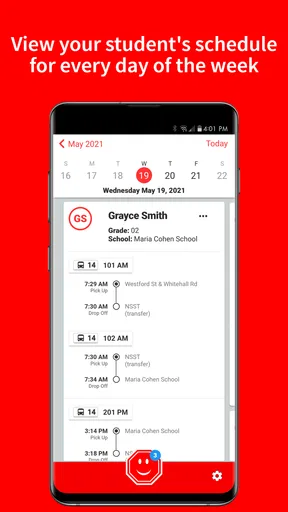
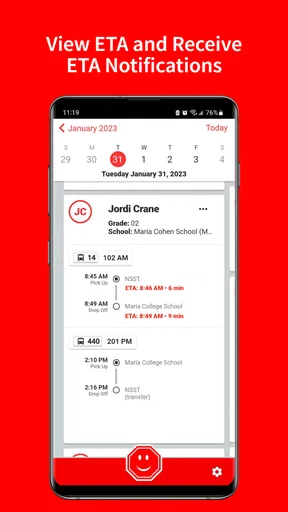
A realistic morning use might look like this: I am preparing for school, a relative is taking over the drop-off routine, and I want to confirm the student’s usual bus stop before leaving the house. Instead of relying on memory, I open the app and check the daily stop information. That is a small task, but it is exactly the kind of task where a focused app earns its place. The benefit is not entertainment or a large collection of tools; it is reducing uncertainty at a moment when there is little time for uncertainty.
The same connected setup can help when a caregiver needs context. A grandparent, babysitter, or older sibling may know the child’s school but not the transportation details. Having the stop information in one dedicated place is easier than forwarding a long school message and hoping the right line is noticed. I would still encourage families to agree on a backup plan, because an app should not be the only source of information when a child is waiting outside.
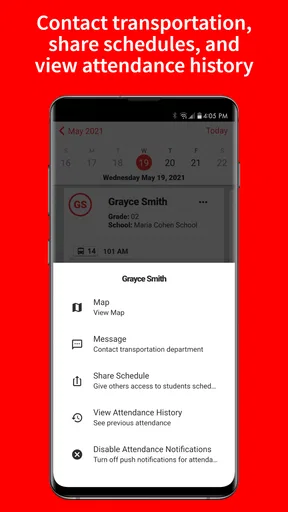
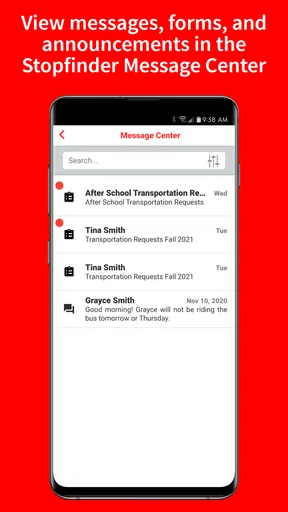
There is also a useful separation between checking information and communicating with the transportation department. Those are related tasks, but they are not identical. A displayed stop can answer “where is the student assigned to go?” while communication is better suited to questions, corrections, or circumstances that need attention from the people managing transportation. Treating those functions separately helps avoid sending a message when a quick check would answer the question, and it also avoids assuming that a displayed detail can be changed instantly from the phone.
What the everyday mobile experience gets right
Stopfinder makes the most sense on a phone because transportation questions usually appear away from a desk. I can imagine checking it at the front door, in a parking area, or while another adult is taking responsibility for the school run. That mobile context is its strongest argument over a desktop-only school portal. The information is closer to the moment when it is needed.
Worth Reading Before You Choose

EA SPORTS FC Mobile 26 Is a Bigger Football Game, but It Takes Time

Flipboard Shows What News Apps Must Do Beyond the Feed

Switching to Android Auto Means Rethinking Your Driving Routine

Google Calendar Makes a Crowded Week Easier to Manage

Ludo King Makes the Most of the Minutes Between Plans

Baby Panda World Brings Quick Play to Modern Phones, but Its Game Library Feels Busy
That convenience has a practical trade-off. A phone screen encourages quick glances, which is helpful when confirming a stop but less helpful when trying to investigate a complicated transportation issue. I would use the app for the immediate reference and communication, then keep a broader school contact method available for anything involving several children, unusual arrangements, or a time-sensitive change that needs personal confirmation.
The app is free, carries an Everyone content rating, and is available for devices running Android 8.0 or later. Those details make it approachable for families using an older compatible phone, although compatibility is not the same as a guarantee of a smooth experience on every device. The current version is 3.1.5, so I would keep the app updated through the normal device store process rather than assuming an old installation will behave exactly like a current one.
Because the app concerns student transportation, I would be deliberate about who uses it and how. A family may have several adults involved in the routine, but not every person needs the same access or responsibility. Before handing over a phone, I would make sure the adult understands which student information is being viewed and which questions should go directly to the transportation department. That is not a criticism of Stopfinder; it is a sensible habit for any app connected to a child’s daily schedule.
When the connection is strong, and when it becomes the weak link
The most obvious limitation is that a connected experience can become less dependable when the phone has a poor signal, the household network is unavailable, or the transportation information has not yet been updated. I would not plan a child’s entire morning around being able to open the app at the curb. A better habit is to check important details before leaving, especially if the day is unusual or a different caregiver is handling the trip.
This is where Stopfinder differs from a paper note in an important way. A paper note is static and can become outdated, while a connected app is intended to reflect information maintained by the transportation system. The advantage is timeliness when the underlying information changes. The disadvantage is that access relies on the phone and connection being ready at the moment of need. I see that as a trade-off rather than a reason to reject the app.
I also would not confuse the presence of stop information with a promise that every real-world event will be visible immediately. A bus can be delayed, a child can miss the usual departure, or a family can face a last-minute change. Stopfinder is valuable for the transportation details it presents and for contacting the department, but a parent still needs ordinary judgment. If a child is waiting and something feels wrong, calling the appropriate school or transportation contact is more responsible than repeatedly refreshing a screen.
For that reason, I recommend a simple recovery routine. Check the app once in a place with a reliable connection, verify the student and the relevant day, and then use the communication route when the displayed information does not match what the family has been told. If the phone is unavailable, fall back to the school’s established contact method and the household’s agreed meeting plan. This approach keeps the app useful without making it a single point of failure.
Using less data without making the app less useful
Families who pay close attention to mobile data should think about when they open the app. Transportation information is usually something I would check deliberately rather than leave running in the background. Opening it at home on Wi-Fi, when convenient, can reduce unnecessary mobile-data use and gives me a calmer moment to notice whether the student details look right.
I would also avoid repeatedly reopening the app simply because a bus is taking longer than expected. Refreshing a screen over and over may not provide a better answer, particularly when the issue is an operational delay rather than a missing display. A more sensible workflow is to check the relevant stop information, wait for the established communication channel if one is expected, and contact the transportation department when the situation calls for clarification.
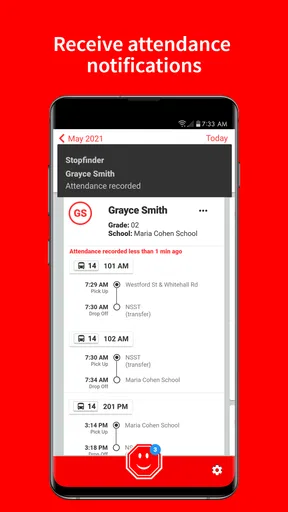
Another useful habit is to keep notifications and device settings purposeful. I would not enable every alert automatically without considering whether each one helps with the family’s actual routine. Too many prompts can make an important transportation message easier to overlook. On the other hand, a caregiver who rarely opens the app may benefit from a carefully chosen reminder if the device and service provide that option. The right balance depends on how often the household needs the information and how many adults share responsibility.
Privacy also deserves a practical approach. Since the app is associated with student transportation, I would use a screen lock, avoid leaving the phone unattended while the app is open, and be cautious when discussing stop details in public. These steps do not make the app harder to use; they simply recognize that convenience and personal information need to coexist. I would especially avoid sending screenshots of student transportation details through casual group chats unless every recipient genuinely needs them.
Who will benefit most from this focused tool
Stopfinder is a strong fit for families whose school transportation department uses it as part of the daily routine. It is particularly useful when several adults share pickup responsibilities, when a child’s stop needs to be checked before leaving home, or when a caregiver wants a direct way to communicate about transportation instead of searching for a general school office number.
It can also help households that are tired of keeping transportation details in scattered places. A message thread, a printed schedule, and a child’s memory can all be useful, but they do not always agree or remain easy to find. A dedicated app gives the transportation question its own place. My advice would be to make the first check part of the family’s routine, not something saved only for emergencies. Familiarity matters when the morning is already busy.
I would be more cautious about recommending it to someone who expects a comprehensive family dashboard. Stopfinder is not the right choice if your main need is homework tracking, teacher communication, attendance, lunch information, or broad school announcements. In those situations, the school’s main parent portal or communication system may be more appropriate, with Stopfinder serving only as the transportation companion.
It may also be a poor fit for a family that rarely uses school buses or whose transportation department does not rely on the app. The app’s usefulness is tied to the local transportation setup, so the best question is not whether the feature list sounds attractive in isolation. The better question is whether your child’s school and transportation process make this app part of the information flow you actually need.
How it compares with paper schedules, messages, and general portals
Compared with a paper schedule, Stopfinder offers a more convenient way to consult transportation information from a phone and provides a communication path to the transportation department. Paper still has one advantage: it remains readable when the phone battery is low or connectivity is unavailable. I would therefore see a written backup as sensible for important routines, especially for younger children or households with frequent handoffs.
Compared with searching through email or text messages, the focused design is easier for a specific question. Old messages often contain a mixture of dates, reminders, and unrelated school information. A transportation app can be quicker when I only need to identify the student’s daily stop. Messages remain better for preserving a conversation, explaining a special circumstance, or keeping a record of advice from a school employee.
Compared with a general parent portal, Stopfinder has a narrower purpose and may be easier to open when the only issue is the bus. A general portal wins when I need a complete view of school life. I would not replace one with the other unless the school clearly directs families to do so. In practice, the most useful arrangement may be a small toolkit: the school portal for broad communication, Stopfinder for transportation details, and a phone contact for urgent clarification.
The app’s reception suggests that this focused purpose resonates with many users. It has an average rating of 4.4 from around 2.7 thousand ratings, with over 1.2 thousand written reviews and more than 100 thousand installs. I read those figures as evidence of meaningful adoption rather than proof that every family will have the same experience. Transportation systems differ, and an app can feel excellent when the local process is well organized but less helpful when information changes slowly or communication is unclear.
My verdict on connectivity and daily reliability
After looking at how it fits into real routines, I see Stopfinder as a practical education app with a deliberately limited job. Its best quality is not that it tries to manage every part of school life; it concentrates on helping families check student bus-stop information and reach the transportation department. That focus makes it easier to recommend to households that depend on school buses and want a mobile reference instead of a pile of messages.
Its connected nature is both the reason to use it and the reason to prepare a backup. When the phone has access to the relevant information, the app can remove small but recurring moments of doubt. When the connection, device, or transportation update is unavailable, it cannot replace direct contact or common-sense planning. I would check it before the morning rush, avoid treating repeated refreshes as a delay solution, and keep the school’s normal contact route available.
For a free app from Transfinder Corporation with an Everyone rating, Stopfinder is worth trying when your school transportation department supports it. I would recommend it to parents, guardians, and shared caregivers who need a quick way to confirm daily stops. I would skip it as a primary solution if you want a full school-management app, live journey tracking, or a tool unrelated to bus transportation. Used within its proper boundaries, Stopfinder is most valuable as a connected safety net for everyday bus routines, not as the only plan a family has when the network or the schedule lets them down.
Pros
- Real-time bus tracking helps families monitor a student's journey.
- Stop and route details are easy to access from the main screen.
- Supports safer pickup planning with arrival notifications.
- Useful for checking transportation updates while away from home.
- Designed specifically for school transportation information.
Cons
- Availability depends on whether the local school district supports Stopfinder.
- Some features may require an invitation or account from the school.
- Tracking accuracy can vary with GPS coverage and cellular connectivity.
- Notifications may be delayed during service disruptions or network issues.
- The app may offer limited usefulness outside participating districts.
FAQs for Stopfinder
What is Stopfinder and what can I use it for?
Stopfinder is a school transportation app designed to help families view bus information, assigned stops, routes, and transportation updates in one place. After signing in with the details provided by your school district, parents or guardians can typically check scheduled pickup and drop-off information, review route details, and receive notifications when available. The exact features depend on whether the local school system supports them.
How do I log in to Stopfinder?
Stopfinder access is usually connected to your child’s school district or transportation provider rather than being completely open to the public. You may need an invitation, student information, or an account created through the district’s transportation system. If your login does not work, confirm that your email or phone number matches the school’s records and contact the district transportation office, since app support may not be able to authorize access independently.
Can Stopfinder show my child’s bus location in real time?
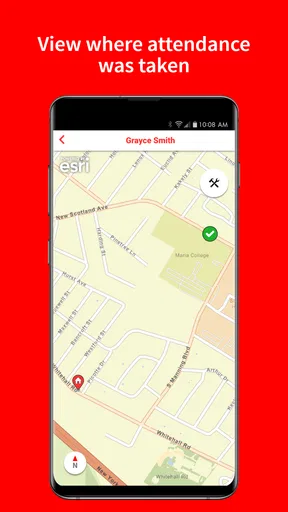
In supported districts, Stopfinder may provide transportation tracking features such as estimated bus location, route progress, or alerts related to pickup and drop-off. However, real-time tracking is not guaranteed for every school or route. Availability can depend on the district’s hardware, transportation software, bus connectivity, and privacy settings. Treat the displayed information as an aid and continue following the official instructions provided by your school.
Will Stopfinder send notifications about delays or schedule changes?
Stopfinder can offer notifications for certain transportation events, including route changes, delays, cancellations, or approaching pickup times, but the alerts you receive depend on the services enabled by your school district. Before relying on notifications, check the app’s settings and allow push notifications on your device. It is also wise to monitor official school messages because urgent updates may be communicated through other channels.
Is Stopfinder free and is my personal information safe?
The app is generally available to download without a separate purchase, although access and transportation services are arranged through participating schools or districts. Stopfinder may process account, student, route, and location-related information so it can provide transportation features. Review the app’s privacy policy and your district’s data practices before using it, keep your login private, and avoid sharing screenshots that reveal a child’s address, schedule, or route.


